

Overview
- Business Process – Sales, Customers
- Grain of Data – Each item purchase made by a customer
- Dimensions – Products, Customers, Territory
- Fact – Sales, Returns
- Measures – Total Sales, Total Units Sold, Gross Profits, Return Rate, Avg Sales e.t.c
- Data Definitions – Table and Column definitions (details excluded for demo purposes)
- Data Profiling – Count of Rows, Nulls, Duplicates, Value Count, Min, Max, Mean, Median (details excluded for demo purposes)
AWS S3
AWS S3 is a highly durable, reliable storage cloud service offered by Amazon. Arizona Bike Store is using S3 to store transactional data. The s3 bucket is called “arizona-sales-data”.
Arizona-Sales-Data S3 Bucket (Source Data)


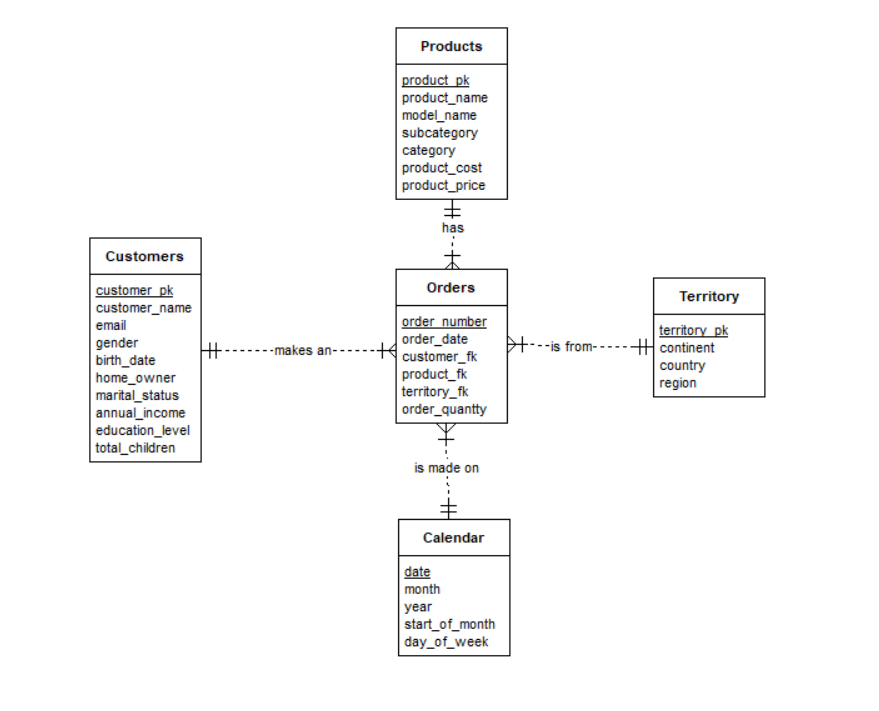
ER Diagram – Star Schema
Entity Relationship Diagram with ER Assistant.
We de-normalized the data to create a Star Schema by joining the products, subcategories, and category tables together.
Sales Mart Star Schema
Snowflake Cloud Data Warehouse
Snowflake is a SaaS tool for building and developing robust cloud data warehouses.
For this project, we implemented the following;
- I created a warehouse in Snowflake called “REPORTING” (note that the warehouse name should suffix with _WH for proper naming convention).
- Created a database called “ARIZONA_STAGING.” This stored source data from Fivetran, and staging/transformation data from dbt.
- Created a Schema called “SOURCE”. This stored source data.
- Extracted and loaded source data from AWS S3 bucket to Snowflake using Fivetran. (See extract and load tab)
- Transformed the data in DBT (Data Build Tool). (See data transformation tab)
- Deployed the transformed data to the core/reporting database called “ARIZONA_CORE.”
REPORTING Warehouse
ARIZONA_STAGING Database > Source Schema > Tables
ARIZONA_STAGING > DBT Transformation Schema > Tables & Views

ARIZONA_CORE Database > SALES_MART Schema > Tables

DIM_DATE Calendar table (however not used in this project)


Fivetran
Fivetran is a modern data integration tool with over 170 connectors for various applications and services. It is also a fully managed SaaS data extraction tool.
Delta Load
The Delta load is the initial load. We implemented the following;
- Created connectors to the AWS S3 bucket “arizona-sales-data,” where the source data is stored.
- Created an IAM policy “Fivetran-S3-Access” and IAM role “Fivetran_role” for Fivetran to access the S3 bucket and source files.
- Created a destination for the Snowflake Reporting Data warehouse.
- Ran an initial sync.
Fivetran IAM Policy
Fivetran IAM Role
Fivetran AWS Connector 
Fivetran AWS Connector Setup
Fivetran AWS Connectors for Orders, Customers, Products, Territory and Returns
Fivetran Destination > Snowflake 
Fivetran Destination > Snowflake Connection
Fivetran AWS Connector Fact_Orders Schema (after initial sync)

Incremental Load
Fivetran implements incremental load automatically by syncing the destination data with the source data. This is where costs has to be managed depending on the business requirements. Incremental load was set to;
Sync Frequency: 24 hrs (3:00 PST)
Delay Threshold: Standard
Fivetran also implements a delete policy by maintaining the record deleted while adding a deleted column to indicate the record was deleted in the source. This can be filtered at destination if the need arises,

The Slowly Changing Dimension Type 2 was handled by DBT in data transformations.
DBT
Data transformation would be done using the Data Build Tool (dbt)
The following was implemented in dbt;
- Staging and Core Models were developed.
- Staging models include stg_customers, stg_products, stg_territory, stg_orders, stg_returns.
- Core Models include dim_customers, dim_products, dim_territory, fact_orders, fact_returns.
- Data was de-normalized to build the Star Schema by joining products with subcategories and categories.
- Source and Tests were created in sources and schema YAML files.
- Staging Models were materialized as views.
- Core Models were materialized as tables. (Please note that Core models would be materialized as “incremental” when the table becomes very large).
Data Lineage Graph

Staging Models


Core Models

Please note that customer orders were aggregated in dim_customer for demo purposes. This doesn’t need to be aggregated because relationships would be created to fact_orders when data modelling before building the dashboard.

Denormalization (Joining of products with subcategories and categories)

Sources yaml

Schema yaml

DBT Tests

DBT Run

DBT Generate Docs

Slowly Changing Dimension Type 2
Slowly Changing Dimension Type 2 is a powerful tool that allows you to effectively track changes over time in your source data. For instance, in order processing or shipping data, you can monitor each stage of the order delivery process, from processing to shipping and delivery. This enables you to analyze the efficiency of each process by examining the time lag between stages, thereby improving your overall operations.
In most situations, order processes go from;
- “Pending”
- “Processed”
- “Shipped”
- “Delivered”
- “Returned” (if the product has a defect).
SCD Type 2 enables you to track and analyze all these stages.
The source data doesn’t have a shipping or delivery attribute or table.
- We demonstrated SCD Type 2 by creating a new table called “Order_Shipping.”
- We retrieved the last seven orders from the orders table and inserted their order number and order status as processed. Also assumed orders were processed on the same day.

- We created a dbt snapshot of the order_shipping table and a new schema called “SNAPSHOTS” (to store all snapshots).
- We ran the dbt snapshot command, and viewed the snapshot table created by dbt.


- As we can see above dbt created “DBT_UPDATED_AT”, “DBT_VALID_FROM” and “DBT_VALID_TO” attributes.
- DBT_UPDATED_AT holds the last updated date for that record.
- DBT_VALID_FROM and DBT_VALID_TO showed the period the old process starts and ends.
- We updated the order_shipping status to “shipped”, while assuming that shipping took 3 days from the day the order was processed.

- We re-ran the DBT snapshot to see the changes.
- The updated record was inserted as a new record with DBT_VALID_FROM showing the updated date and DBT_VALID_TO showing nulls (because the process is still active).
- While the DBT_VALID_TO was updated for old records showing the process has ended.

Job Schedule
Job scheduling can be done in DBT or Fivetran by integrating your DBT models into Fivetran. Fivetran Transformations enable you to integrate your dbt models and link them with the connectors and destination data warehouse. So when the connectors run, they initiate the transformations to the Core database. See Tests tab
Using DBT Jobs
Using DBT Jobs, we schedule job runs every 24 hours, precisely at midnight. Thanks to the modern cloud data infrastructure and compute power, transformations from the source data to the target schema (ARIZONA_CORE > SALES_MART) occur without disrupting other services. This seamless process provides a reliable and consistent data pipeline.
DBT Jobs

Schedule Jobs

Job Runs
Data Modeling
Data Modeling is the process of structuring and organizing data by creating and defining entities, attributes, data types, relationships, and constraints and normalizing or de-normalizing the data for effective data management and reporting.
The data modeling process starts with the ER diagram, which creates entities and attributes.
Here we defined relationships between entities using primary keys or surrogate keys. Relationships can be one-one, one-many, and many-many. Relationships help us slice the data from different dimensions. We de-normalized the data in dbt by previously joining the products table with the subcategory and category table.
We would be using Tableau Desktop to define relationships.
- We connected Tableau Desktop to the Snowflake Warehouse: “REPORTING,” Database: “ARIZONA_CORE” and Schema: “SALES_MART.
- We created a one-to-many relationship between fact_orders and dimension tables (dim_customers, dim_products, and dim_territory tables).
- We also defined a one-to-many relationship between the fact returns and both dim_territory and dim_products. We can now slice and dice the data from the different dimensions.

Data Visualization
Data visualization was done using Tableau, a top BI tool for building robust dashboards and storytelling. Worksheets were created and combined in the dashboard.
When creating dashboards, consider three high-level items: “Purpose,” “Audience,” and “Consumption.”
Purpose – The dashboard is designed to provide insights into sales performance, customer behaviours, and distributions and monitor KPIs.
Audience – The dashboard would be used by the sales and marketing manager and business users in sales and marketing department.
Consumption – It will be updated daily and viewed on the web and mobile devices.
Other items to consider when planning are;
- Choosing the right metric, charts, filters and layout.
- Using descriptive data labels to tell a story.
- Optimizing for multiple devices.
We followed the recommended design read and filter principle, which goes left to right.

See Tableau public for a functional demo
Arizona Bike Store Sales Dashboard

Arizona Bike Store Customer Dashboard

Story Telling
Storytelling in data visualization is presenting your data in an actionable format with clickable charts instead of a static format where charts are not clickable. In this storyline, we highlighted key performance indicators.
Some of the insights include;
Arizona Bike Store’s monthly sales show a clear increase from Jun 2021 to Jun 2022.

Bikes brought in the most revenue which would be due to its high price compared to accessories and clothing.

In regional sales, the United States leads with $7,938,999 in revenue and a profit margin of 42%, while Canada is at the bottom with the lowest income of $1,769,246 but with a good profit margin of 43%. The United States has the highest customer population (41.5% of all customers).

There is a significant rise in the number of customers, between July 2021 and Aug 2021. It would be great for the company to take note of what changes occurred during the period in marketing, product quality, customer service management, and more to sustain such growth.

ELT PIPELINE, DATA WAREHOUSE, AND DASHBOARD TESTS
It is essential to run tests during and after development and deployment.
- We ran tests on the ELT pipeline, data warehouse, and dashboard to ensure data flows correctly from the source to the destinations and the dashboards.
- For test purposes, we integrated dbt models into Fivetran transformations, so we could test data flows and transformations from Fivetran.
- We created new orders for Aug 2022.
- We uploaded the new data to the S3 bucket and set the Fivetran sync schedule to 24hrs 15:41 PST.
- We later checked to see if the data warehouse and dashboard got updated.
New Orders Created and uploaded to the S3 bucket (incremental test)

Fivetran Source & DBT Integrated Model


Snowflake Warehouse Test

Tableau Dashboard Test

Report Sharing on Tableau Cloud
The sales and customer report and dashboard would be shared on Tableau Cloud with business users and stakeholders.
Tableau Cloud Home

Tableau Cloud Report Sharing

Executive Report
The executive report was created and submitted to management with recommendations based on insights obtained from the data.
 Executive Report